Healthcare Video Marketing: 12 Video Ideas for Clinics
You don’t need a film crew. Here are twelve short videos a clinic can shoot on a phone, what to say in each, and where each one goes.
Most clinics think video means hiring a crew, renting a studio and spending a month on one polished film that ends up on the homepage. The videos that actually get patients to book are much smaller than that. Healthcare video marketing for search and social is mostly the doctor, a phone, and a question patients already ask.
So here are twelve ideas you can shoot this month, what to say in each one, and where each one should go once it’s done.
Why a phone is enough
Patients aren’t judging the lighting. They’re trying to work out whether this doctor understands their problem and whether they’d feel OK in that room. A clear phone video of the actual doctor answers that better than a glossy one with a voiceover and stock footage.
Shoot vertical, because that’s how people hold the phone they’ll watch it on. Keep it short. YouTube counts a vertical or square video of up to three minutes as a Short, according to its help page on three minute Shorts, but most of these ideas work best well under a minute. Add captions, since people often watch in a waiting room or on a bus with the sound off. And put the doctor in it, not an actor.
12 healthcare video marketing ideas
- Why the doctor does this. Say: “I’m Dr. [Name], and I started treating [condition] because…” in thirty seconds, looking at the camera. Patients are picking a person, and a face and a voice tell them more than a bio ever will.
- Finding us. Film the turn into the parking lot, the entrance and which door to use, with someone saying where to go. Getting lost on the way in is a worry people never mention, and it’s gone once they’ve seen the walk.
- The consultation, acted out. The doctor and a staff member run through a first consultation, with the staff member playing the patient. People stop dreading the appointment once they’ve watched it happen.
- The treatment room tour. Say: “This is where you’ll be. Here’s the chair, here’s what this does.” A room you’ve seen is a lot less scary than one you’re imagining.
- The instrument, up close. Hold it next to something everyone knows, like a pen, and say what it does. Most people picture something far bigger and sharper than it is.
- What it sounds like. Switch the device on and say: “This is the sound you’ll hear, and this is roughly what it feels like.” Only video can do this one, and the sound is often the part people are nervous about.
- The condition, on a model. Use the anatomy model on the desk and point to what’s going on, in words a patient would use. Seeing it explained with your hands sticks far better than a diagram.
- A recovery exercise, shown. The doctor or a nurse demonstrates the exercise or the care routine patients do at home, slowly, from the side. Patients replay it at home instead of guessing from a leaflet.
- How the room gets cleaned. Film the reset between appointments, before the first patient of the day. Clean is something people want to see, and nobody shows it.
- Meet the person who picks up the phone. Ten seconds of a friendly face saying “I’m the one you’ll talk to.” People find it a lot easier to call someone they’ve already seen.
- Answering a comment on camera. Pick a general question someone left under a post and reply with a short video, without saying or hinting that they’re a patient. It shows you listen, and the next person with the same question finds the answer.
- A live Q&A, saved. Go live for fifteen minutes once a month, answer whatever comes in, then keep the replay on your profile. People get to see how the doctor talks when nothing is rehearsed, and that’s most of what they’re judging.
These twelve only work on camera. Condition pages, prices and FAQs work better written down, like the formats in these healthcare content marketing examples.
Like the ideas, but no idea where to start on the day?
Let us plan the shoot for you →How one clip is built
Every one of these follows the same shape. The question goes on screen before the doctor says a word, so someone scrolling knows what it’s about. The answer comes next, and the clip ends with one next step. If those first three seconds don’t say what the video is about, people scroll past before the doctor gets going.
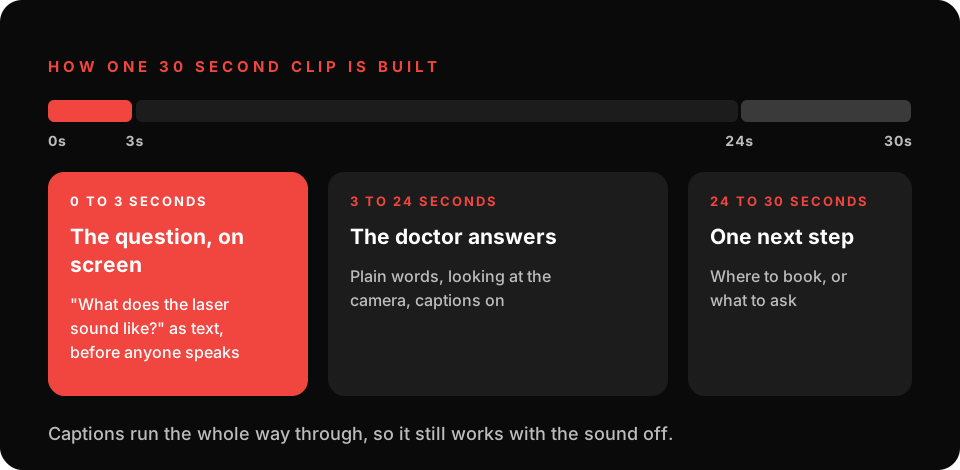
Keep 30 seconds as your default length. It fits everywhere on the list below, including the one place with a hard limit. The live Q&A is the only one that should run long.
Where each video goes
A video nobody sees doesn’t book anyone. Each idea has a natural home, and most of them should go to more than one.
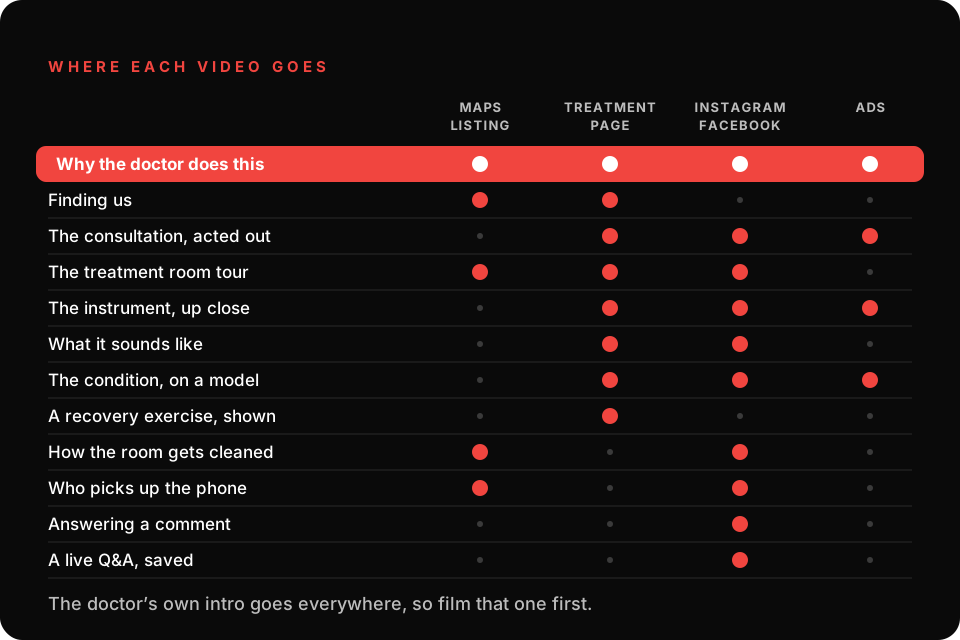
Your Google Business Profile is the one with rules. Google takes videos up to 30 seconds and 75 MB at 720p or higher there, and that listing is the first thing someone sees when they search “near me”. The treatment page gets the longer explainers, right next to the booking button. Instagram and Facebook get the personal ones, and the two or three that do best there are the ones we turn into ads, which is where healthcare lead generation on Meta and Google takes over.
Not sure what goes on Maps, what goes on the page and what becomes an ad?
Let us set up where each clip goes →Check the frame before you film
Clinics give away patient information on camera without meaning to, and it’s almost always in the background rather than the person in the chair. Any patient who could be recognized needs to have signed a written authorization for patient content first, so the simplest rule is to film with no patients around at all.
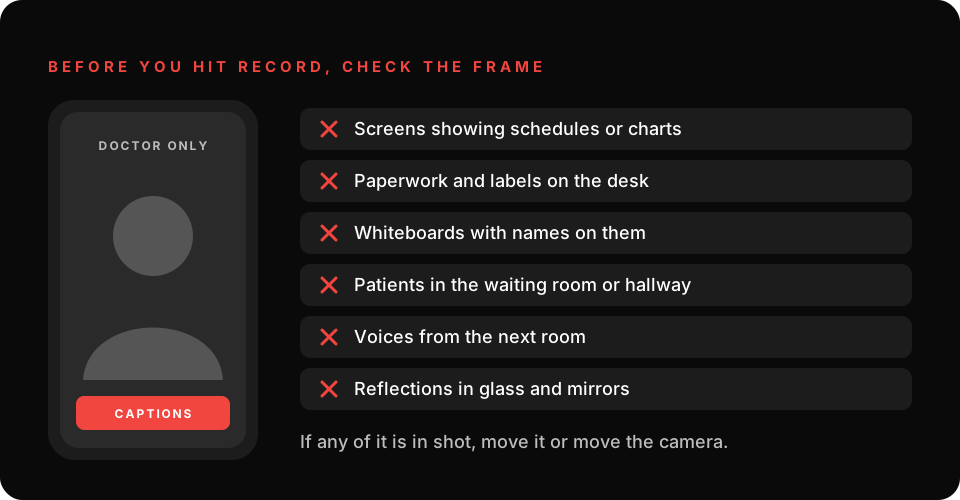
Film in a room with no screens on, before patients arrive or after they’ve gone. And the same care applies once the video is on your site, which is why HIPAA compliant marketing on every page covers the tracking behind it too.
Worried something in the background could show patient information?
Let us check the frame for you →Film it all in one morning
Don’t spread this over twelve weeks. Block one morning before patients arrive, set the phone on a tripod by the window, and film the doctor’s intro, the room tour, the instrument and the sound in one go. Four videos, one setup.
Then post one a week and watch which one people stay with to the end. That’s the clip worth putting money behind on Instagram and Facebook, and the people who watch it and then search your name are the ones PPC for healthcare that starts with one treatment picks up.
Find out what patients see before they call.
Six questions, then learn about the marketing opportunities in your area, including what patients see on your Maps listing today.
Get your assessment →